

Email marketing is still a strong way for businesses to grow in 2026. You get a lot of money back for what you spend. You can get $42 to $45 for every dollar. Most small and medium businesses use email marketing. About 81% use it to get new customers. 80% use it to keep old customers. Picking the best WordPress email marketing plugin is very important now. It makes things work well. It helps with automatic tasks. It makes sure emails get delivered. The best plugins help you talk to your audience. A good email marketing software wordpress or wordpress newsletter plugin helps your messages arrive. This makes your email marketing strategy better.
Key Takeaways
Email marketing is important for business growth. It helps get new customers and keep old ones.
Choose a WordPress email plugin based on your needs. Look at automation, how easy it is to use, and if it works with other tools.
Email deliverability is key. Use tools like WP Mail SMTP or Mails.ai to make sure your emails reach the inbox.
Consider your budget and tech skills. Many plugins have free plans, but some need more technical knowledge.
Improve your email marketing by building a good list. Make content interesting, test your emails, and understand your results.
Key Factors for WordPress Email Marketing Plugins
Automation & Segmentation
You need a plugin. It should do tasks automatically. It should group your audience. Smart grouping puts contacts together. This is based on what they do. Or what they like. This helps you send the right emails. Good grouping tools are very important. They help you target people. Automatic steps make email chains. This is key for good email marketing. This strong email automation makes your campaigns better. It helps you target people well.
Deliverability & SMTP Compatibility
Your emails must get to the inbox. WordPress uses PHP mail. This can cause problems. Use an SMTP plugin. WP Mail SMTP is one. It sends emails through a special service. This adds proper checks. These checks are SPF, DKIM, DMARC. They prove you are the sender. New rules from Gmail and Yahoo need these. This is for people who send many emails. Your spam complaints must be low. Below 0.3%. IP warming helps new websites. It builds trust for senders. Mails.ai warms up in two ways. This helps emails get delivered. This is very important for good email marketing.
Ease of Use & User Interface
A good wordpress email marketing plugin should be simple to use. Look for drag-and-drop tools. They make writing emails easy. A clear layout helps you run campaigns easily.
Integration Capabilities
Your email marketing tools should work well. They should work with other business tools. Some email marketing plugins connect to many things. HubSpot connects to over 300 tools. Omnisend links store data automatically. These connections make one contact list. This helps you make your email marketing personal.
Pricing & Scalability
Think about the cost. Also, how the plugin grows with you. Prices change. Some charge per email sent. Others have plans based on features. Many email subscription plugins have free versions. These are for a few subscribers. Pick a plan that fits your money. And your future growth.
Support & Documentation
Good help is very important. Look for email support. Also, clear instructions. Some plugins offer special setup help. Like WP Mail SMTP's "White Glove Setup." A help center is useful. Product updates are also very helpful.
Specific Use Cases
Different businesses have different needs. A wordpress newsletter plugin can send simple newsletters. Online stores need good WooCommerce links. This includes getting back abandoned carts. Businesses that want new leads need strong email subscription plugins. These help you get more subscribers. A full email marketing software wordpress can manage everything. It does this from your dashboard. This helps your whole wordpress email marketing plan.
Top WordPress Email Marketing Plugins for 2026
You need good tools. They make your email marketing work. Here are the best WordPress email marketing plugins for 2026. They help you talk to your audience. They help your business grow.
MailPoet: Best for WordPress-Native Email Marketing
MailPoet lets you do all your email marketing inside WordPress. You make, send, and manage campaigns. You do not leave your dashboard. This makes it a true wordpress newsletter plugin.
Overview: MailPoet helps you make, send, manage, and grow email marketing campaigns. It works fully inside your WordPress dashboard. It connects well with the platform.
Key Features:
You can make a newsletter sign-up form. You can add it to your website.
Manage your subscribers and lists. Do this right in WordPress.
Build and send newsletters. Do this from inside WordPress.
Make automatic emails. These are for new posts and welcome messages.
Group subscribers. Do this based on what they do. Or what they like.
Use over 50 ready-made email templates. You can also change them. Use a drag-and-drop editor.
MailPoet Sending Service makes sure emails get delivered. It sends emails fast. It handles bounces. It checks emails with SPF and DKIM.
Pros: MailPoet works with WordPress. It has high delivery rates. It promises 99% global delivery. It has built-in automation and templates.
Cons: It might not have all the fancy features. Other special email marketing platforms have them.
Pricing: MailPoet has a free plan. This plan includes the MailPoet Sending Service. Paid plans unlock more features. These include automation and detailed stats.
WordPress Rating & Active Installations: Not available in the provided information.
FluentCRM: Best for Marketing Automation
FluentCRM is a strong CRM. It is also a marketing automation plugin. It works on your own WordPress site. It helps you manage customers. It automates your email marketing.
Overview: FluentCRM is a WordPress plugin. It mixes customer management (CRM) with email marketing automation. You can manage contacts. You can send emails from your WordPress site.
Key Features:
You can make advanced email automations.
It has easy ways to group and tag people.
It helps you get new leads. Do this right from your website.
You can track what customers do. Do this inside WordPress.
Pros: FluentCRM helps you make advanced email automations. It has easy grouping and tagging. It can be easily expanded. Its price is good. It costs less than many CRMs.
Cons: It does not have ready-made email templates. It does not have automation templates. These are for workflows you can use right away.
Pricing: FluentCRM has a good price. Exact pricing details are not in the information given.
WordPress Rating & Active Installations: Not available in the provided information.
Brevo (formerly Sendinblue): Best for All-in-One Marketing
Brevo is a full marketing platform. It offers email, SMS, chat, and CRM tools. It helps you manage all customer talks. Do this in one place.
Overview: Brevo (used to be Sendinblue) is a full marketing solution. It helps businesses build customer relationships. It has email, SMS, chat, and CRM tools.
Key Features:
It has a CRM and live chat.
You get marketing automation and web tracking.
Aura AI helps write content.
A/B testing is on bigger plans.
It has advanced connections. It also has send time optimization.
Pros: Brevo gives you many tools. Its price can be very good. It has many features. These are for different business needs.
Cons: Some advanced features cost more. These are like many users or a special IP. The free plan has limits. It has Brevo's name on it.
Pricing: Brevo has different plans:
Feature | Free | Starter | Business | Professional | Enterprise |
|---|---|---|---|---|---|
CRM | Yes | Yes | Yes | Yes | Yes |
Live chat | Yes | Yes | Yes | Yes | Yes |
A/B testing | No | No | Yes | Yes | Yes |
Aura AI | Yes | Yes | Yes | Yes | Yes |
Marketing automation | Yes | Yes | Yes | Yes | Yes |
Web tracking | Yes | Yes | Yes | Yes | Yes |
Max contacts in automated campaigns | 2,000 | 2,000 | Unlimited | Unlimited | Unlimited |
Opens, Clicks, Location & device reporting | Basic | Basic | Advanced | Advanced | Advanced |
Click heat map | No | No | No | Yes | Yes |
Phone & email support | Only email | Only email | Priority email | Phone | Customer success manager |
Integrations | Yes | Yes | Yes | Advanced | Advanced |
Send time optimization | No | No | Yes | Yes | Yes |
Dedicated IP | No | No | No | Add on | Included |
Multi-user access | No | No | Yes, up to 10 | Yes, >10 users | Yes, >10 users |
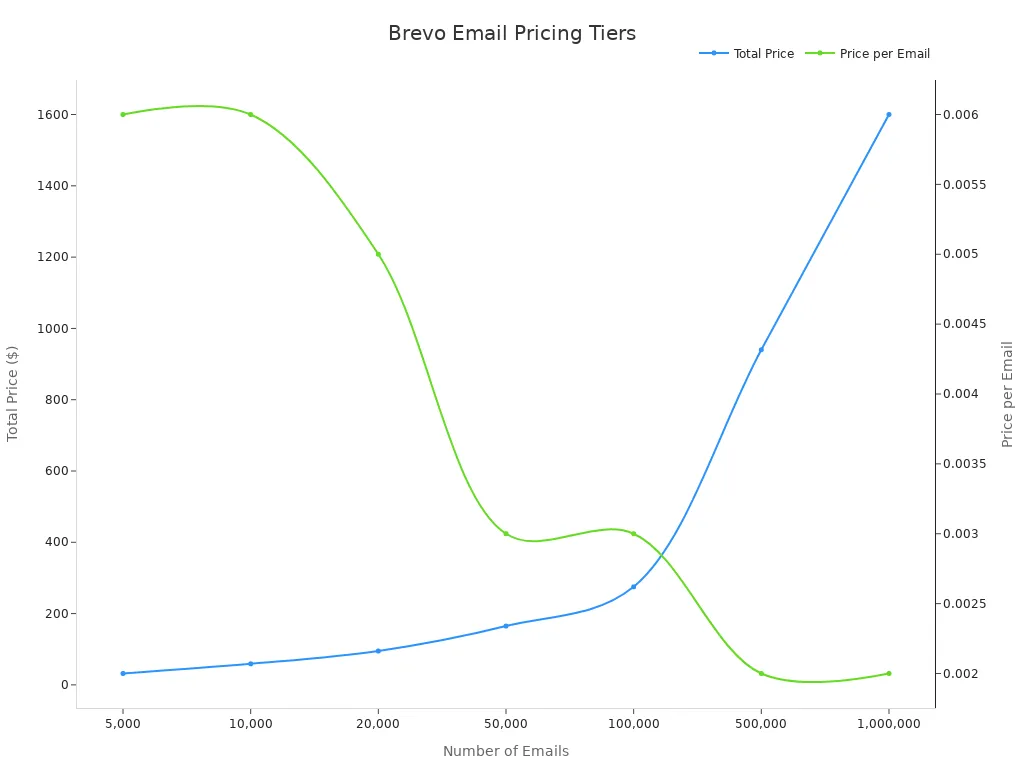
[You can also buy email packs](https://www.emailtooltester.com/en/reviews/brevo/pricing/).
Number of emails | Price | Price per email |
|---|---|---|
5,000 | $32 | $0.006 |
10,000 | $59 | $0.006 |
20,000 | $95 | $0.005 |
50,000 | $165 | $0.003 |
100,000 | $275 | $0.003 |
500,000 | $940 | $0.002 |
1,000,000 | $1,600 | $0.002 |
These packs include all Essential plan features. Credits never run out. Brevo's pay-as-you-go is often cheaper. It costs less than others.
The Lite plan costs $25 a month. It does not have A/B testing. It lacks advanced stats. It has the Sendinblue logo on emails. The Essential plan costs $39 a month. It removes the logo. It adds features. Both Lite and Essential plans do not have multi-user access. They lack live chat. They do not have advanced automation for many contacts. These are in the Premium tier. It starts at $66 a month.
[Here is a quick look at the plans](https://www.sender.net/reviews/brevo/pricing/):
* **Free Plan**: 1 user. Basic templates. Email help. Basic reports. It has a daily send limit. It has Brevo's name on it. It is not good for long-term use.
* **Starter Plan**: 1 user. Full templates. Email help. Basic reports. It does not have automation. It lacks detailed analysis.
* **Standard (Business) Plan**: Up to 3 users. All templates. A/B testing. Email and chat help. Advanced reports. It has one landing page limit.
* **Professional Plan**: Up to 10 users. Advanced marketing tools. Detailed reports. Many users can work together. Scalable automation. Advanced grouping. Custom dashboards.
* **Enterprise Plan**: Unlimited users. Made for sending many emails. It has popups. It has WhatsApp campaigns. It has push messages. It has advanced store features. It has a special account manager.
WordPress Rating & Active Installations: Not available in the provided information.
Omnisend: Best for E-commerce Email & SMS Automation
Omnisend is for online stores. It helps them sell more. It uses email and SMS automation.
Overview: Omnisend is an email marketing software wordpress solution. It focuses on online stores. All its tools help keep customers. They help make sales.
Key Features:
It connects to your online store. This lets you use store data. It helps with product choices. It gives recommendations.
You can make campaigns for many channels. This includes SMS messages. It also includes push notifications.
It has flexible grouping. It tracks what people do. This helps target people well.
An easy email builder has ready-made designs. It has an AI helper for content.
Advanced marketing automation has workflow templates. It has rules for what happens.
It has ready-made workflows. These are for abandoned carts. They are for after-purchase follow-ups. They are for getting customers back.
AI-powered grouping uses real-time actions. It uses buying data.
Pros: Omnisend is very good for online stores. It has strong multi-channel features. It has advanced targeting.
Cons: It might not be good for businesses. These businesses are not online stores.
Pricing: Not available in the provided information.
WordPress Rating & Active Installations: Not available in the provided information.
Mailchimp for WordPress: Best for Mailchimp Integration
This plugin helps connect your WordPress site with Mailchimp. It makes it easy to add Mailchimp forms. It helps manage subscribers.
Overview: Mailchimp for WordPress is a plugin. It makes a smooth link. This is between your WordPress site and your Mailchimp account. It helps your email list grow.
Key Features:
Custom style options help forms look good. They match your website's design.
You can manage sign-ups and campaigns. Do this right from WordPress.
You can make custom email templates.
It sends automatic welcome emails. It sends autoresponders.
It helps with abandoned cart emails. These are for online stores.
Pros: It connects deeply with Mailchimp. It makes sure designs match. It makes management simple.
Cons: Its features depend on your Mailchimp plan.
Pricing: Not available in the provided information.
WordPress Rating & Active Installations: Not available in the provided information.
MailerLite: Best for Complete Email Software
MailerLite is a full email software. It helps you send campaigns. It helps build forms. It helps create landing pages.
Overview: MailerLite is a complete email software solution. It helps businesses with all parts of email marketing. It has tools for campaigns, forms, and automation.
Key Features:
You can send email campaigns. You can send promotions. You can send newsletters.
It helps you build sign-up forms. It helps build pop-ups.
You can make websites and landing pages. It includes hosting.
It groups email lists. This is based on traits or actions.
It automates emails. This is from welcome flows. It is to multi-stage onboarding.
AI Writing helps with headlines. It helps with descriptions. It helps with subject lines.
It supports SPF, DKIM, and DMARC. This is for delivery.
Pros: MailerLite has many features. It is good for different email marketing needs. It has AI writing tools.
Cons: It might be too much for new users. This is because it has many features.
Pricing: Not available in the provided information.
WordPress Rating & Active Installations: Not available in the provided information.
HubSpot: Best for All-in-One CRM & Email Marketing Software
HubSpot has a strong CRM. It has email marketing software. It helps you manage customer relationships. It helps run email campaigns.
Overview: HubSpot gives you an all-in-one CRM. It has email marketing software. It helps WordPress users manage leads. It tracks customer actions. It automates marketing.
Key Features:
It has CRM and contact management. You can talk to visitors. Do this with live chat and chatbots.
It gets leads. It uses custom forms. It tracks every customer action.
You can help leads grow. Do this by sending newsletters. Automate email marketing campaigns.
It has over 20 ready-made email templates. It has a drag-and-drop builder.
It lets you do A/B testing for newsletters. It tracks emails. It gives analytics.
Pros: HubSpot has a strong CRM. It has many email marketing features. It gives a full view of customers.
Cons: It can be hard to set up. Higher plans can cost a lot.
Pricing: Not available in the provided information.
WordPress Rating & Active Installations: Not available in the provided information.
ActiveCampaign: Best for Advanced Automation
ActiveCampaign is great for advanced marketing automation. It helps you make very personal customer journeys.
Overview: ActiveCampaign is a top platform. It is for advanced marketing automation. It helps businesses make personal experiences for customers.
Key Features:
You can start automations. Do this from WPForms submissions. Or from WooCommerce purchases.
It gets leads. Do this right from your website.
It makes contacts personal. It groups them. This is based on WordPress activity.
You can track what users do. You can make drip campaigns. Do this from page visits.
It has an AI automation builder. This makes workflows. It uses simple language.
A Brand Kit makes email templates automatically. It uses your website's fonts and colors.
It has dynamic emails. It has automated grouping.
Pros: ActiveCampaign has very advanced automation. It has AI features. These are for making workflows. It makes things very personal.
Cons: It might be harder to learn. This is because of its advanced features.
Pricing: Not available in the provided information.
WordPress Rating & Active Installations: Not available in the provided information.
Mails.ai: Best for Scaled Cold Email Outreach

Mails.ai is an AI platform. It helps you send many cold emails. It makes sure they get delivered well.
Overview: Mails.ai is an AI-powered platform. It is for sending cold emails. It helps businesses grow smarter. It keeps emails delivering well. It mixes AI-made content. It has automatic follow-ups. It has advanced delivery tools.
Key Features:
You can connect many email accounts.
An AI Email Writer makes good email content.
Dual Warmup has two parts. It has automatic mailbox warmup. It has campaign warmup. This helps emails get to the inbox faster.
Inbox Rotation sends emails from different accounts. This lowers spam risk.
Email Verification cleans lists. This means fewer bounced emails.
Automated Follow-Ups keep talks going.
Advanced Analytics show real-time numbers.
Pros: Mails.ai offers many email accounts. It has unlimited two-layer warmup. It allows unlimited email sending. It includes free email checking. It has an AI email writer. It makes sure emails get to the inbox.
Cons: Not applicable.
Pricing: Mails.ai has flexible pricing plans:
Free Plan: $0 a month. You get many email accounts. You get unlimited email warmup. It works with Gmail and Google Workspace.
Startup Plan: Starts from $24 a month (yearly payment). It has many email accounts and warmup. You get 1,000 active contacts a month. It offers unlimited emails monthly. It has unlimited uploaded contacts. It has an email verifier. It has an AI writer. It has unlimited team members. It has unlimited campaigns. It has unlimited campaign warmup. It has unlimited sequences. It has a custom tracking domain. It has advanced reports.
Growth Plan: Starts from $49 a month (yearly payment). It has all Startup Plan features. You get 5,000 active contacts a month.
Pro Plan: Starts from $99 a month (yearly payment). It has all Growth Plan features. You get unlimited active contacts a month.
WordPress Rating & Active Installations: Not applicable as Mails.ai is a standalone platform.
OptinMonster: Best for Lead Generation & Pop-ups
OptinMonster is a strong tool. It helps turn website visitors into subscribers. It turns them into customers. It uses different sign-up forms.
Overview: OptinMonster is a popular tool. It gets leads. It captures emails. It helps your email list grow. It turns website visitors into subscribers and customers.
Key Features:
It has different campaign types. These are Popup, Fullscreen, Floating Bars, Slide In, Inline.
It helps grow your email list. It helps stop people from leaving carts. It helps increase sales.
You get real-time action automation.
It has smart A/B testing. It has conversion analytics.
It has over 700 templates.
Features like Exit Intent® and MonsterLinks™ help get leads.
It connects with many email marketing services. It connects with WordPress plugins.
Pros: OptinMonster is very good at getting leads. It has many campaign types. It has many templates. It has advanced targeting features.
Cons: It mostly focuses on getting leads. It is not a full email marketing solution.
Pricing: Not available in the provided information.
WordPress Rating & Active Installations: Not available in the provided information.
WP Mail SMTP: Best for Email Deliverability
WP Mail SMTP is very important. It is for any WordPress site. It makes sure your emails get to the inbox. It stops them from going to spam.
Overview: WP Mail SMTP makes email delivery better. It sends emails that are checked and correct. This is important. Email services are getting stricter. It protects your domain's name. It makes sure emails are delivered reliably.
Key Features:
It checks emails. This helps avoid spam filters. It protects your IP's reputation.
It connects with different SMTP providers. This is for safe email sending.
It keeps full email records. This tracks delivery status and content.
An automatic alert system tells you about failed emails.
It has a reliable backup mailer connection. This keeps emails sending.
It makes detailed email reports. This tracks delivery rates and open rates.
Pros: WP Mail SMTP is key for email delivery. It checks emails. It stops them from being marked as spam. It is easy to set up.
Cons: It is not a full email marketing solution. It only focuses on sending emails.
Pricing: Not available in the provided information.
WordPress Rating & Active Installations: Not available in the provided information.
Comparison Table: Top Email Marketing Plugins
Quick Glance at Key Features
You need to compare features. This helps find the right tool. Each plugin has special strengths. Look at this table. It gives a quick look at some top choices.
Plugin | Key feature | AI & automation | Best for | |
|---|---|---|---|---|
Jetpack Growth | Seamless integration with WordPress | Yes | Bloggers and beginners | $9.95/month |
Mailchimp for WooCommerce | Detailed reports | Yes | WooCommerce store owners | $20/month |
OptinMonster | Various ways to display opt-in forms | Yes | People who are struggling to gain subscribers | $7/month |
Constant Contact | Surveys and polls in newsletters | Yes | Small business owners and marketers | $12/month |
MailPoet | Multi-condition segmentation | Yes | Bloggers who want advanced segments | $9/month |
MailPoet has templates you can change. It has sign-up forms. You can use a drag-and-drop editor. It sends welcome emails automatically. It works well with WooCommerce. Jetpack Growth lets you have paid subscriptions. It shows how subscribers and campaigns are doing. You can add sign-up forms to posts. You can add them to pages. Mailchimp for WooCommerce has many email templates. It has automatic emails. These are for follow-ups. They are for cart reminders. You get full reports on your email campaigns. OptinMonster has over 700 templates. You can change them. It uses AI to make content better. Its pop-ups appear when people leave. This helps get subscribers. WPForms helps you make sign-up forms easily. You do not need to code. This is great for getting leads. It works with many email marketing services.
Pricing & Free Plan Availability
Cost is a big thing. It matters when picking a plugin. Many plugins have free plans. Paid plans give you more features. Here are the starting monthly prices. These are for some popular choices.

Some plugins offer free versions. WP Mail SMTP has a free version. Its Pro version costs $49 per year. Brevo (Sendinblue) also has a free plan. Its paid plans start at $25 per month. Omnisend has a free plan. Its paid plans start at $16 per month. MailPoet has a free choice. Its Pro version starts at $11 per month. The Newsletter Plugin is free. Its Pro version costs $65 per year. Other plugins, like OptinMonster, start at $29 per month. Constant Contact starts at $20 per month. You can find a plan. It will fit your money.
Choosing the Right WordPress Email Marketing Plugin
You need to pick your next email marketing plugin wisely. Think about what you need. This helps you find the best one.
Aligning with Business Goals
Pick a wordpress email marketing plugin that fits your business goals. Think about what you want to do.
Features and functionality: Match plugin features. These include templates, automation, grouping, and reports. They should match your email marketing goals. Choose advanced options first. These are A/B testing, store links, or CRM links. Pick based on what you need.
Ease of use: Pick plugins that are simple to use. They should have drag-and-drop tools. This is true if you do not code. Good links with WordPress make work easier.
Integration and compatibility: Make sure the plugin works well. It needs to work with your WordPress. It needs to work with other plugins. For stores or CRM users, pick a plugin. It should connect easily. This keeps your work smooth.
Scalability and pricing: Choose a plugin that can grow with you. It should not cost a lot more. Look at prices. Make sure they fit your money. Free versions let you try first.
Customer support and documentation: Look for good help. This means live chat, email, or a help center. Good reviews and helpful support mean a good plugin.
Budget Considerations
Your money is very important. Many email marketing plugins have free plans. These are great for small businesses.
MailPoet (Monthly) | Mailchimp (Standard, Monthly) | FluentCRM (Yearly + SMTP, Monthly Avg.) | Newsletter (Yearly + SMTP, Monthly Avg.) | |
|---|---|---|---|---|
1,000 | Free or ~$15 | ~$30 | ~$7 | Free + SMTP costs |
10,000 | ~$70 | ~$100 | ~$11 | Free + ~$6 |
50,000 | ~$270 | ~$350 | ~$27 | ~$8.25 + ~$25 |
Self-hosted tools can save money. This is true as your list grows. But they need more tech work.
Klaviyo: Has a free plan. It is for up to 250 contacts.
Brevo: Has a free plan. It lets you send 300 emails daily.
Mail Mint: Has a free plan. It has few features. Free plans are great for small businesses. You can try email marketing for free. Most businesses pay $15 to $50 each month. This pays for the plugin and email service. Free plans work for small lists. These are under 500 people. Growing businesses should plan for $20-$30 a month. This gets you good features.
Assessing Technical Skill Level
Your tech skills matter. Pick an opt-in plugin that is easy. Many plugins are not made well. Their advanced parts do not work with modern caching. Being easy to use is key for everyone. If you do not know much tech, making complex forms is hard. Gravity Forms makes this simple. It is very easy to use. It helps you make complex forms. They have many choices. Premio's WordPress plugins are simple to set up. They have easy screens. This makes things smooth for website owners. This focus on ease helps people. They want simple ways to get more people involved. If you want a simple wordpress newsletter plugin, ease is key. Constant Contact is good for new email marketing users. It is popular for beginners. Some plugins have easy screens. This makes them usable for all skill levels.
Future Growth & Scalability
Think about your business getting bigger. Your chosen email marketing software wordpress must handle more emails. It needs to send thousands of emails fast.
The plugin must handle more emails. It must send many emails. It should send thousands to hundreds of thousands. It should not slow down.
Easy links with other tools are key. This includes form builders like WPForms. It includes stores like WooCommerce. This makes automatic steps. It makes your tech tools work together.
Send many emails using special servers. This keeps your website fast. It keeps it working well.
Keep subscriber data on safe, outside servers. Do not keep it in your WordPress database. This makes your customer info safer.
You picked your plugin. Now, use it well. Good habits make your email marketing strong. You can get the most from WordPress.
Good Ways to Build Your Email List
You need a good email list. Offer better content. Give a deeper blog post. You get an email for it. Use good gifts for sign-up forms. Think about eBooks. Or white papers. Put these forms in smart spots. Put them in sidebars. Put them in pop-ups. Put them in blog posts. Put them in footers. Show how many followers you have. This shows people like you. It makes others join. Make a great lead magnet. This gets more people to sign up. Make your sign-up forms better. Use WordPress plugins. Like WPForms or Gravity Forms. This makes words better. It makes forms easier to see. These plugins help you grow. Email capture plugins also help. You can target people better.
Making Email Content Interesting
Make your emails interesting. Tell stories. Make people feel part of it. This builds excitement. Make emails personal. Change them for what people like. Or what they do. Give useful content. Make them good for phones. Make sure emails look good on all devices. Use responsive design. Be steady. Keep your brand the same. Use the same colors. Use the same fonts. Use the same tone. This makes your email campaigns better. You send personal messages.
A/B Testing to Make Things Better
Make your email marketing work better. Test one thing at a time. This gives true results. Run tests long enough. Aim for two weeks. Look at results correctly. Use math tools. Use the best changes for good. Keep testing other things. Keep notes of old tests. This shows patterns. Pick one thing to test. This could be a subject line. Or a button. Split your audience in two. Send Version A to one group. Send Version B to the other. Look at important numbers. This includes how many open. How many click. Use what you learn. Use it for future emails. This makes your targeting better.
Understanding Your Numbers
Understand your email data. Look at key numbers. These include Open Rate. Click-through Rate. Conversion Rate. Also, Unsubscribers. And Money Per Email. Look at changes over time. Do not just look at one number. Divide your audience. Understand how groups act. Compare numbers across campaigns. Find good ways that work. A/B test email parts. This makes things work better. Use what you learn to keep improving. If an email opens a lot but sells little, change the words. Add special discount codes. See which emails make people leave. Change how often you send. Make audience groups better for targeting. This makes your email efforts best. A wordpress newsletter plugin can help.
Good email marketing helps your WordPress business. It helps in 2026. Pick a plugin that fits your needs. It should fit your money. It should fit your tech skills. Many plugins have good features. Mails.ai is special. It helps emails get to inboxes. It checks emails for free. You can link many email accounts. You send many emails. You get endless warm-up. You get inbox rotation. This makes sure your messages arrive. It makes people more interested. Make your email marketing better. Get started for free today!
FAQ
How do I pick the best WordPress email marketing plugin for my business?
Match your choice to your business goals. Think about your money. Think about your tech skills. Look for features. These include automation. Also, grouping. And how it connects to other tools. Pick a plugin. It should grow with you.
Why is email deliverability important for my WordPress email campaigns?
Good deliverability means your emails get to the inbox. They do not go to spam. This helps your open rates. It helps people engage. It keeps your sender reputation safe. Tools like WP Mail SMTP help. Mails.ai also helps.
Does Mails.ai work directly with my WordPress website?
Mails.ai is a separate tool. It sends cold emails. It does not have a WordPress plugin. You can use it with your WordPress site. It helps with email delivery. It automates your outreach.
What is good about using dual-layer warmup with Mails.ai?
Dual-layer warmup builds your sender reputation. It makes sure campaigns deliver well. This means your messages always reach the inbox. It helps people engage more.
Share this post